Portfolio management for an owner-occupier in Odoo 19
A local authority, public body or administration that occupies its own buildings has no leases to invoice. It needs to know what it owns room by room, where the plans are, who occupies what, which regulatory obligations are falling due, what the buildings cost and where the documents are. The Portfolio modules of TSC Immo cover this scope in Odoo 19, on Community as well as Enterprise, with no Enterprise module required.
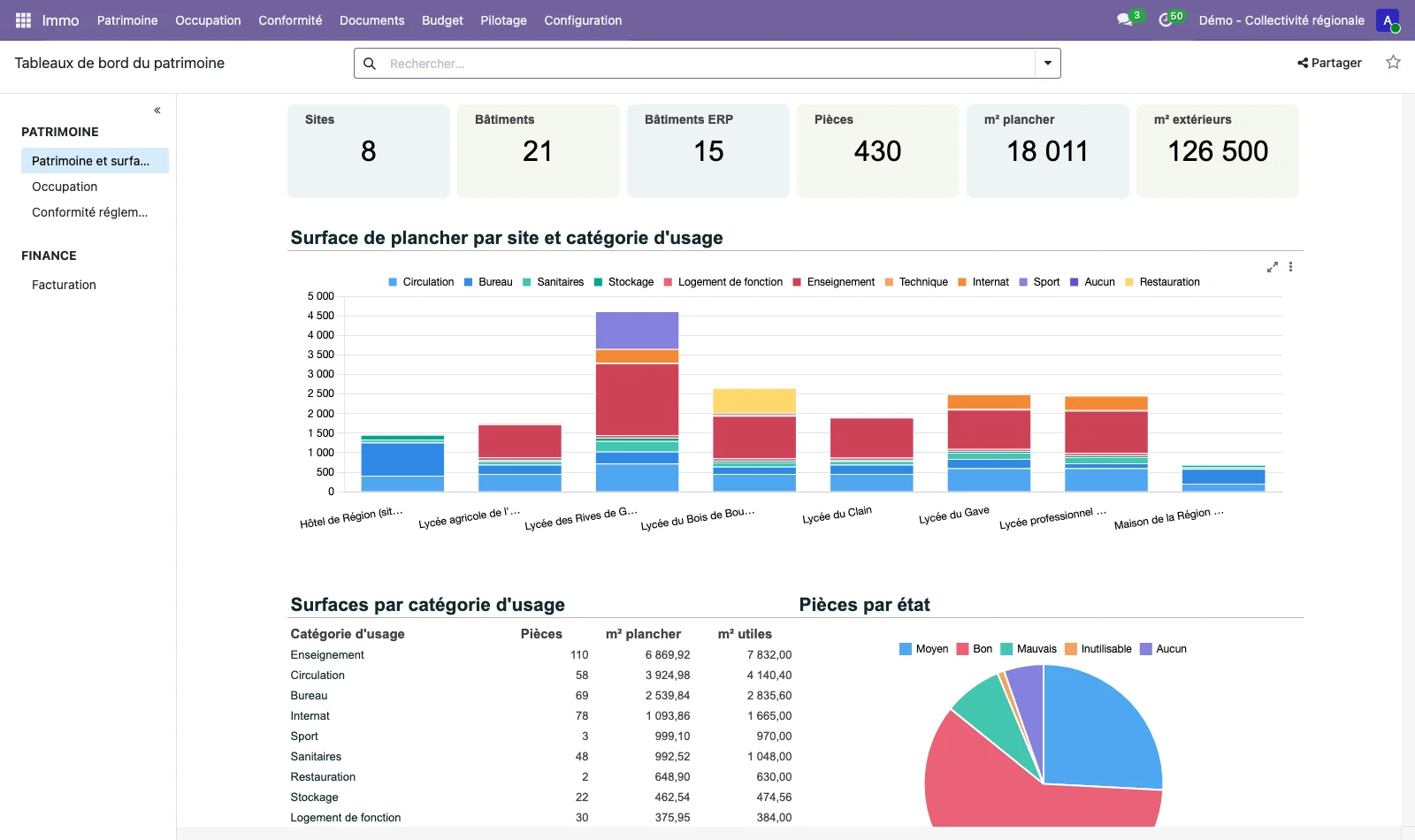
The Portfolio modules and their scope
Each module has its own page or section. They share the same reference data: a room created in the space register is the same one that carries an outline on a plan, an assignment, an obligation, a budget or a document.
| Need | Module | Where to read the details |
|---|---|---|
| Territories, sites, buildings, floors, zones, rooms, equipment | immo_space |
Plans and spaces |
| DWG, DXF, IFC and PDF plans, plan viewer, legal floor areas | immo_plan |
Plans and spaces |
| Work orders placed on the plan | immo_plan_maintenance |
Plans and spaces |
| Room occupancy by divisions and departments | immo_occupation, immo_plan_occupation |
Occupancy section, below |
| Obligations, inspections, outstanding issues, alerts | immo_compliance, immo_plan_compliance |
Regulatory compliance |
| Planned and actual figures by site, building, floor or room | immo_budget |
Budget section, below |
| Folders, versions, validation, sharing, full-text search | immo_ged |
Portfolio document management |
| Building health record, dashboards | immo_synthesis |
Building health record section, below |
| Mobile app for field operatives | immo_intervention_portal |
Mobile portal section, below |
| Sign-in with Keycloak | immo_auth_keycloak |
Authentication section, below |
Room occupancy by departments
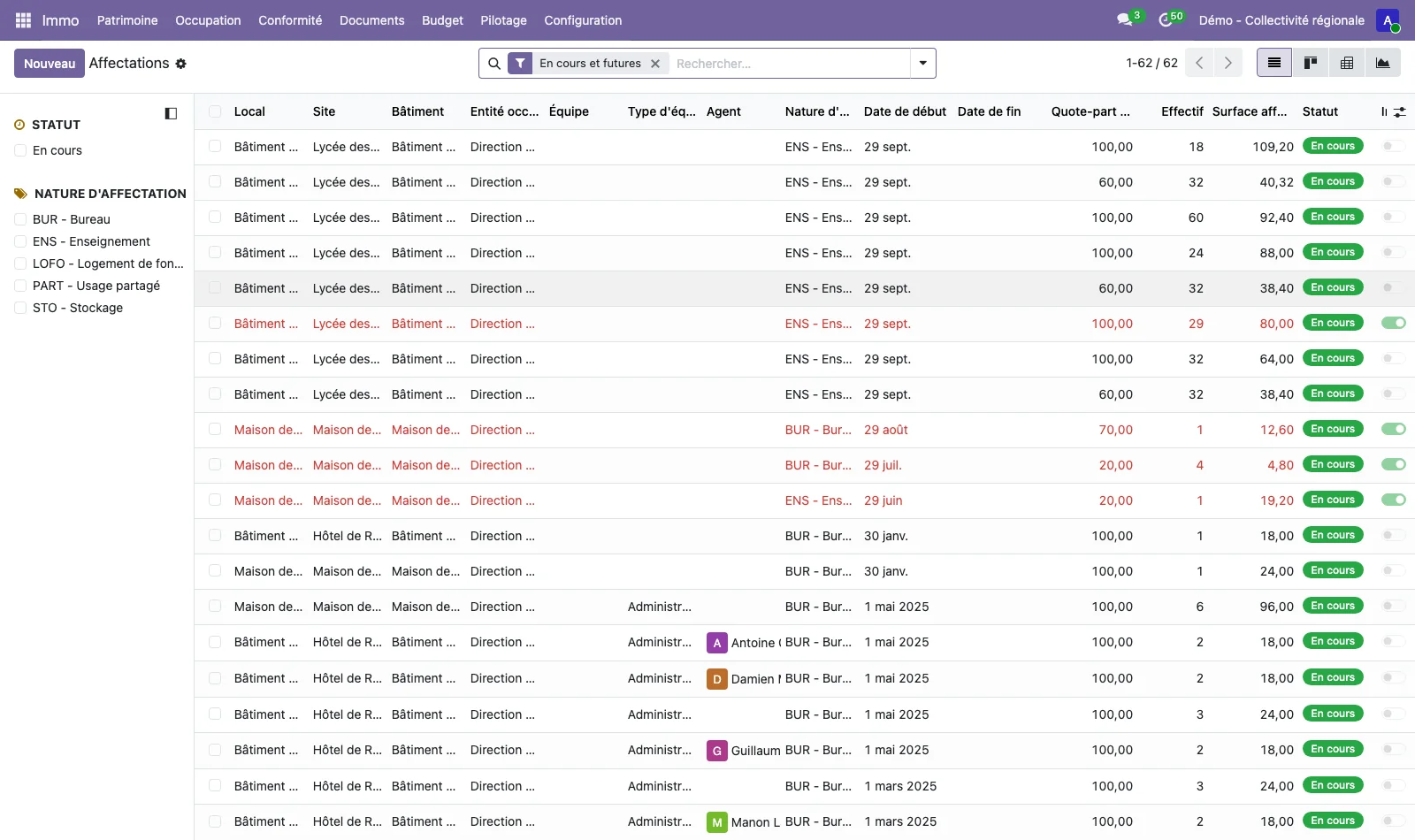
The immo_occupation module assigns a room or a zone to a division, a department, a team and, where needed, to a staff member. Each assignment has its type (office, teaching, staff accommodation, shared use, storage), its period, its share of floor area and its headcount. An assignment is never overwritten: the Reassign and Move wizards close the old one and open the new one, and a past assignment can be restored.
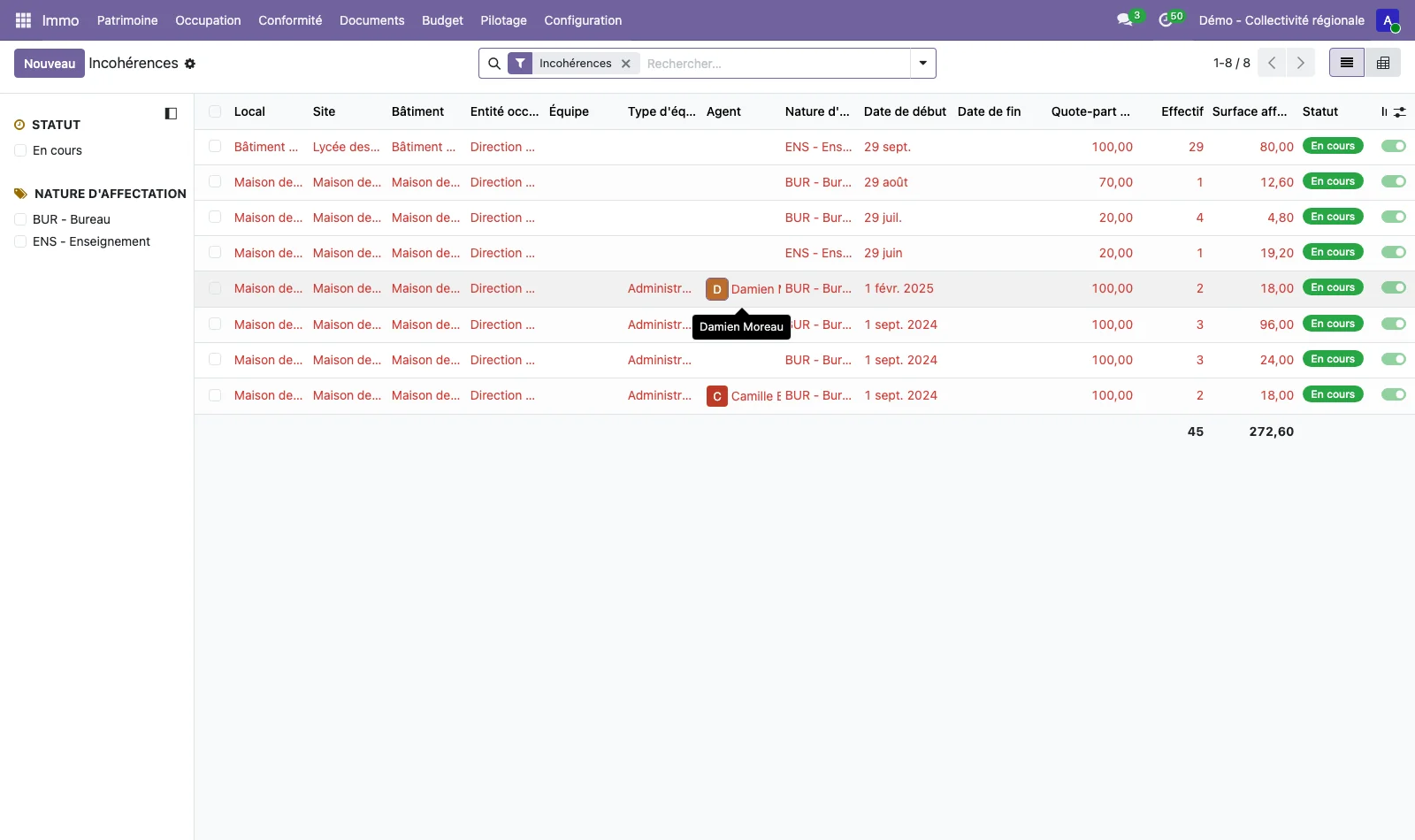
Inconsistencies are flagged without ever blocking data entry: shares above 100%, headcount above capacity, a type incompatible with the use of the room, an assignment on an archived space. Occupancy rates (occupied area over available area, headcount over capacity, square metres per staff member) are calculated for each room, floor, building and site, and updated at every change and every night. A monthly snapshot makes it possible to compare periods in the pivot and graph views.
The Occupancy colour theme of the plan viewer (module immo_plan_occupation) colours the rooms of a plan according to their occupancy, their occupying unit or their rate: see Plans and spaces.
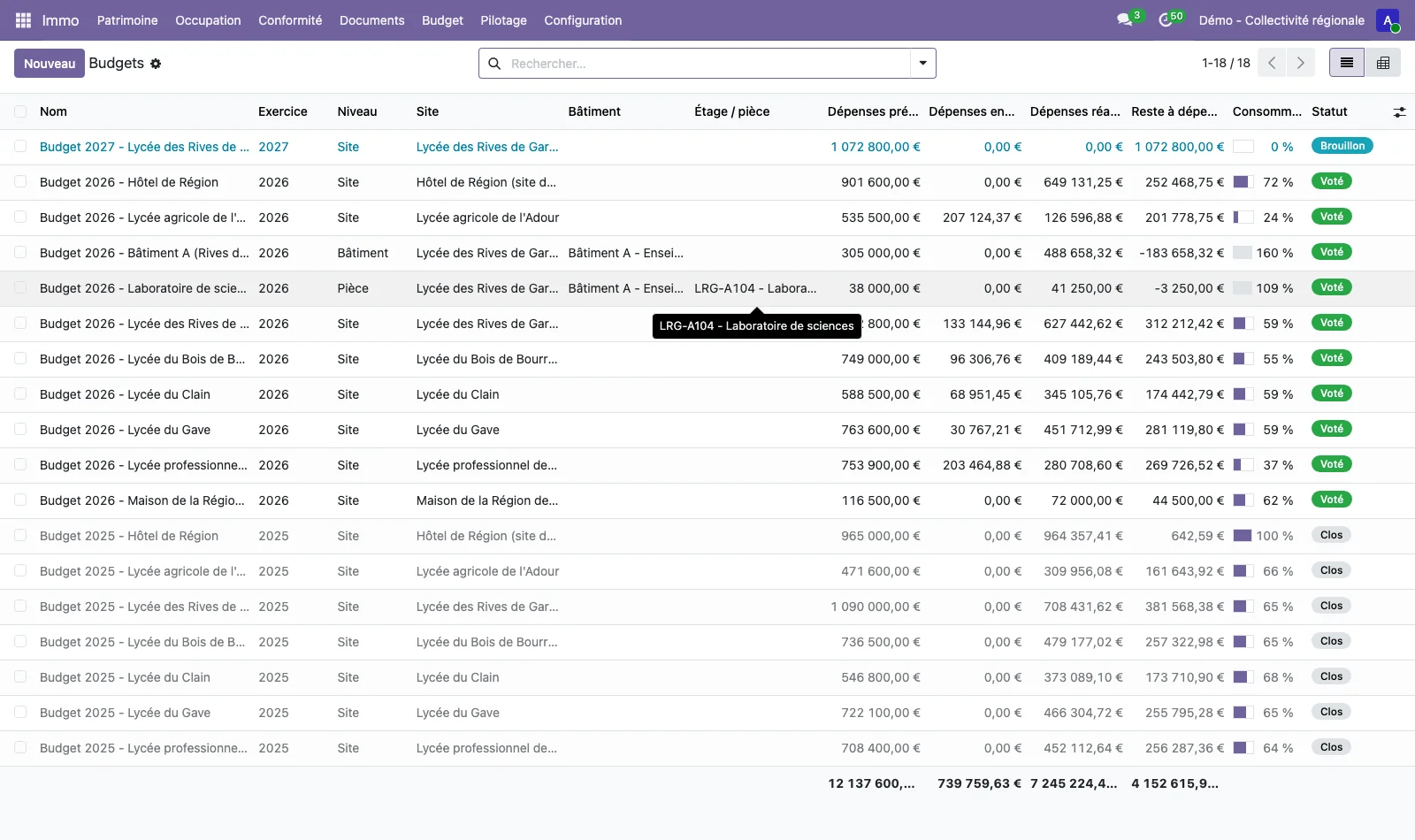
Planned and actual budget
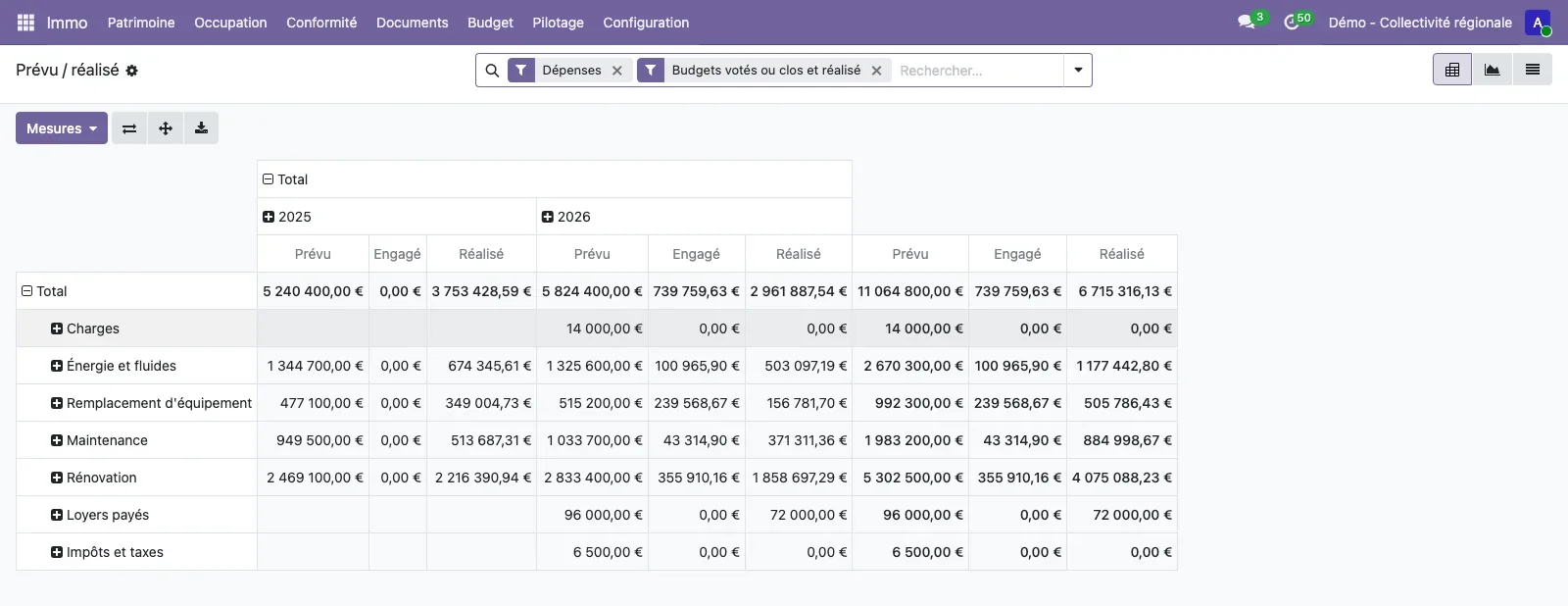
The immo_budget module does not require the budget module of Odoo Enterprise. Categories are configurable (capital or operating, expenditure or income) and grouped into families: construction, maintenance, equipment replacement, refurbishment, energy, rent paid, charges, taxes and duties, rent received and occupancy fees.
A budget is voted per financial year for a site, a building, a floor or a room. Actual expenditure and income is committed or paid, at every level of the portfolio, and linked to the vendor bill or customer invoice where there is one. The import from analytic accounting turns the analytic lines of buildings and units into actual expenditure and income, without ever counting them twice. Planned and actual figures are compared in a pivot or graph view, by usage, type, condition, location, territory and financial year, and the building or site record shows the budget summary and the cost per square metre of floor area.
Building health record and dashboards
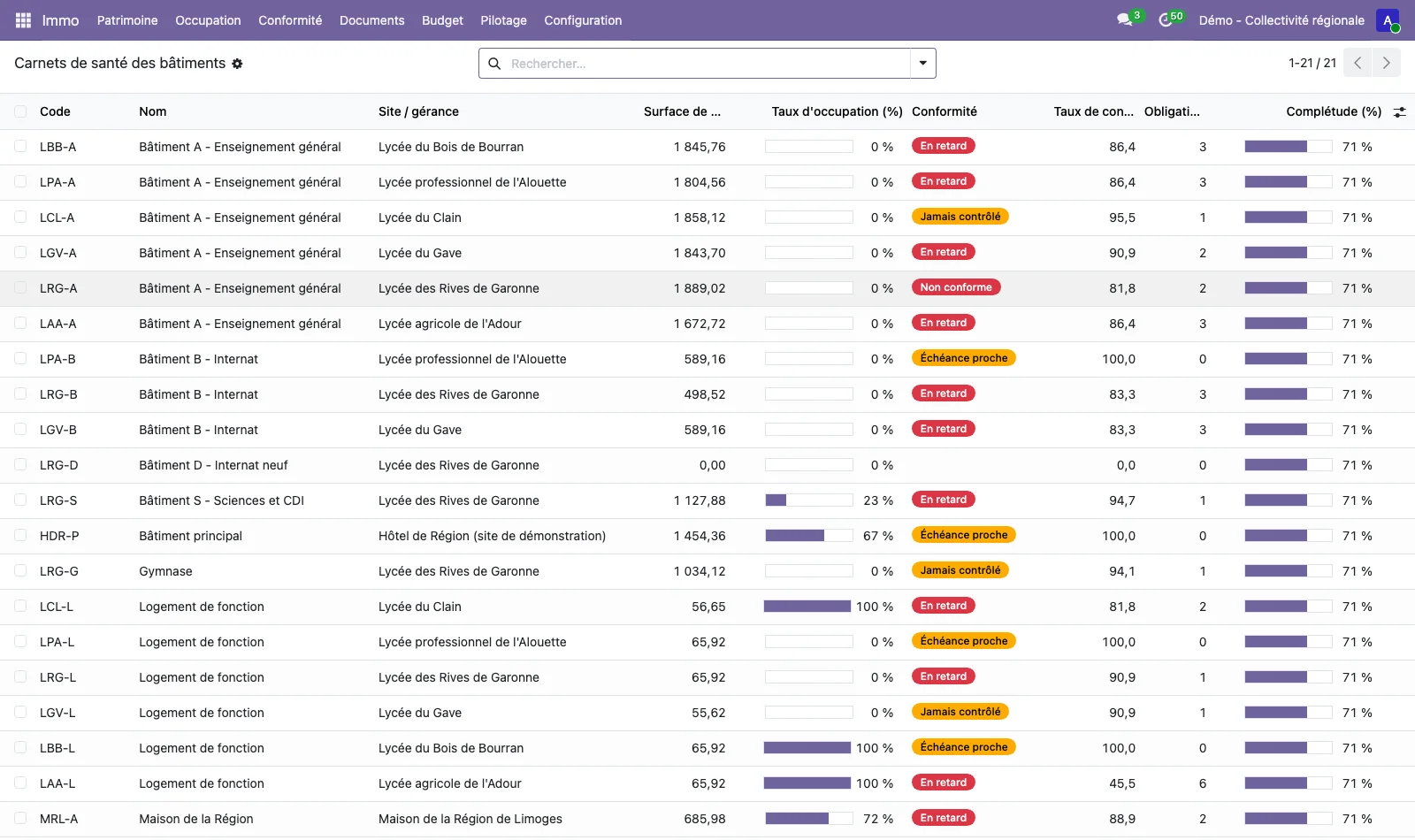
The immo_synthesis module prints the building health record of a building or a site as a PDF, one at a time or in batches from the list, as well as a consolidated summary of any selection of buildings. The health record covers the identity of the building, the areas by usage category, the floors described, the occupancy and the main occupying units, the condition of the rooms and the equipment at end of life, the regulatory obligations that are overdue or approaching, the open outstanding issues, the budget for the year, the cost per square metre and how it changes, the key documents and the completeness of the data.
Three dashboards are ready to use (Portfolio and areas, occupancy, regulatory compliance). They can be filtered by site, territory, occupying unit or period. Each user can also build their own dashboard from any pivot or graph view. A public accessibility statement page, configurable by the administrator, is published at /accessibilite on the Odoo instance.
Mobile portal for field operatives
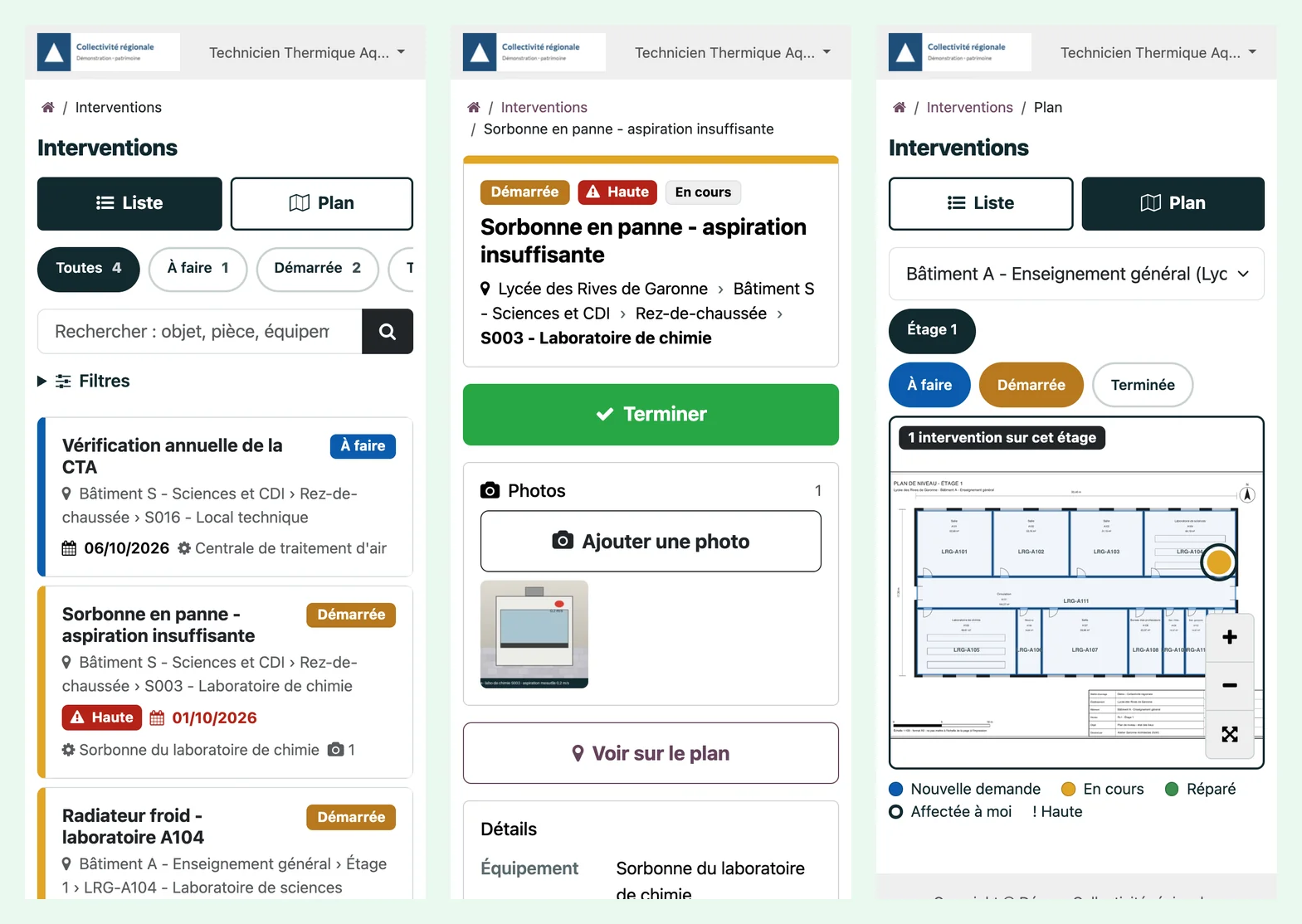
The immo_intervention_portal module gives in-house technicians and external companies a web application designed for the phone, within the Odoo portal. A portal user sees the work orders of their own contact or company and, where the administrator has granted it, all those of a set of sites or buildings.
Work orders appear as cards sorted by priority and due date, with filters by status, building and priority, and a search. The record gives the subject, the location (site, building, floor, room), the equipment, the priority, the due date and the requester. The Start and Finish buttons move the standard Odoo Maintenance stage forward, timestamp the author and allow a short report. Photos taken with the phone are compressed in the browser and stored as attachments to the request, visible in the back-office gallery. The floor plan shows the work orders that the user can see, in the same colours as the back office, and can be handled by touch. The application can be installed on the phone's home screen.
This portal is for field operatives. It is not a tenant portal.
Authentication with Keycloak
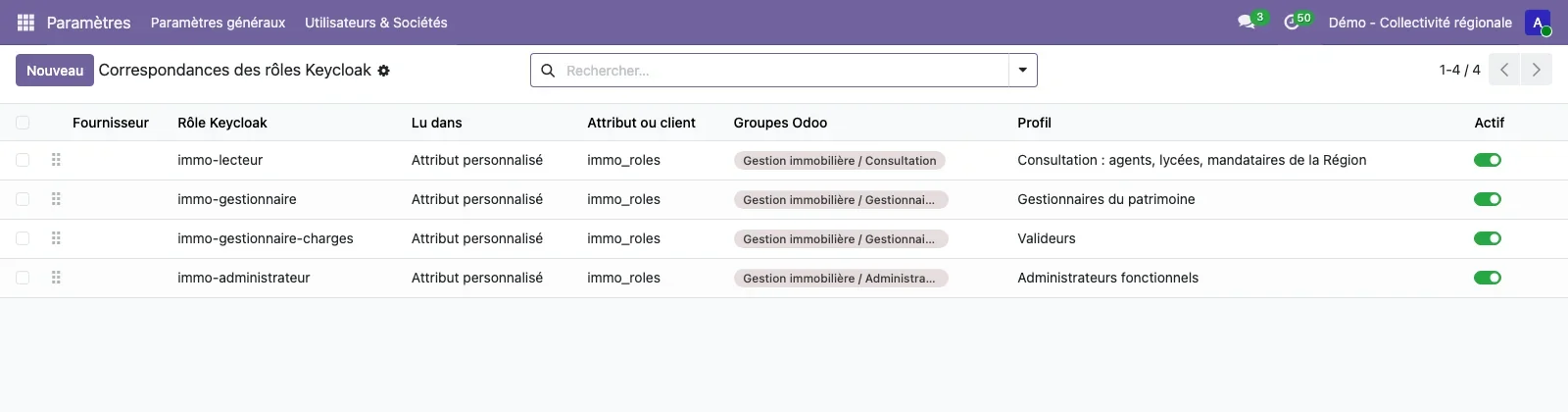
The immo_auth_keycloak module extends the standard Odoo OAuth sign-in (auth_oauth, available in Community) for a Keycloak realm. A Keycloak role, at realm or client level, or a custom claim grants Odoo groups at every sign-in: the groups granted are added, the managed groups whose role has gone are removed, and unmanaged groups are never touched. An unknown staff member receives an internal user account at their first sign-in, built from the token claims and from configurable attributes such as the division or department.
The required authentication level (acr, for multi-factor authentication) is an option, as is hiding the local login form, which remains accessible at /web/login?local=1, and propagating sign-out to Keycloak. A sign-in log records who, when, the roles received, the groups applied and the refusals with their reason. The "authorization code" flow with PKCE goes through the immo_auth_keycloak_oidc module, which relies on the OCA community module auth_oidc and follows its AGPL-3 licence.
What this offer does not cover
The scope of the owner-occupier Portfolio does not include letting. The lease relies on Odoo Subscriptions and on Odoo Accounting, two Enterprise modules: lease management, indexation, service charge statements and rental profitability are described on their own pages and belong to the Enterprise suite.
The data in the screenshots comes from a fictional regional local authority, on real territories. The names of establishments, identification numbers, staff and vendors are invented. A demonstration on your own plans and your own obligations can be requested through the contact form.
See TSC Immo on your own cases
A demonstration on a database with fictitious data, then on your own management questions.
 Connect. Transform. Grow.